Fictional design concept. Lowlight Outdoor Works is invented and owned by Hyper Solutions Consulting. It is not a client, and no real project, result, review or price is shown.
Portfolio write-up · Outdoor living · Concept
Designing a builder's site around the hour after the heat.
Why we drew a dusk pavilion instead of buying stock photos, why materials get a cutaway, and how the page ends with a brief you write yourself.
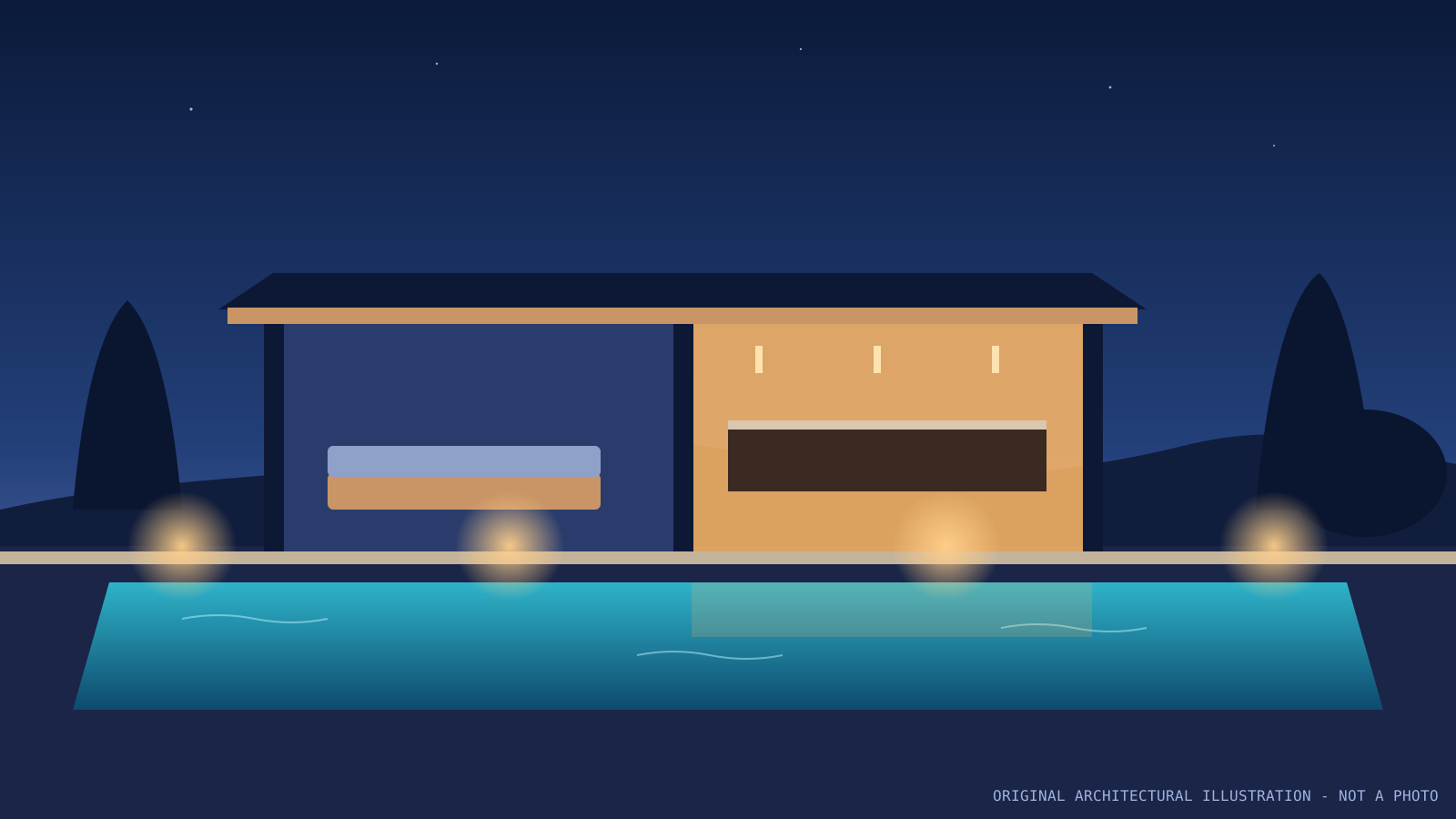
Plate 1Original SVG illustration by Hyper Solutions for the fictional Lowlight concept. Not a photograph of a built project.
Business
Fictional, HSC-owned
Setting
Imagined Gulf Coast builder
Imagery
Two original SVG drawings
Design
Hyper Solutions Consulting
01 · The hypothetical brief
An imagined builder with a real-world problem.
We wrote this brief ourselves to test a direction. Many outdoor-living and custom-build companies face the same tension: the work is beautiful in the evening, the important parts are buried, and the contact form asks for nothing useful. These were the goals we set.
1Show the space at the hour it is used
A hypothetical Gulf Coast outdoor-living builder sells evenings, not noon. The site needed to open on dusk, without pretending to have photographs of finished projects.
2Make the invisible work legible
Base course, drainage and subgrade decide whether a terrace stays level, yet rarely appear on a builder's site. The buyer needed a plain-language way to show them.
3Earn a considered inquiry
Instead of a bare form, the visitor should arrive at contact already knowing what they want to say, and be able to say it in their own words.
02 · Design decisions
Four choices, each tied to a goal.
Every decision below is visible in the demo. If a choice could not be justified by the brief, it was cut.
Decision 01
Blue-hour illustration instead of stock photography
Why
An invented business has no real projects to photograph. An original drawn pavilion sets the mood honestly and is clearly labelled as illustration.
What we built
The hero uses an HSC-drawn SVG with a slow layered dusk, lamp and water effect. A caption states it is not a photo or video.
Decision 02
A four-step walkthrough before any sales copy
Why
People hiring for a large outdoor build want to see how decisions get made before they read promises.
What we built
Numbered stages (dusk visit, drawn section, shade and light, dry-window build) read as a short process, not a feature list.
Decision 03
Rooms you can switch between
Why
One roofline holds a kitchen, lounge and pool edge. Showing all three at once flattens the story.
What we built
Three toggle buttons reframe the same illustration and swap a short description announced politely to screen readers.
Decision 04
A cutaway section for materials
Why
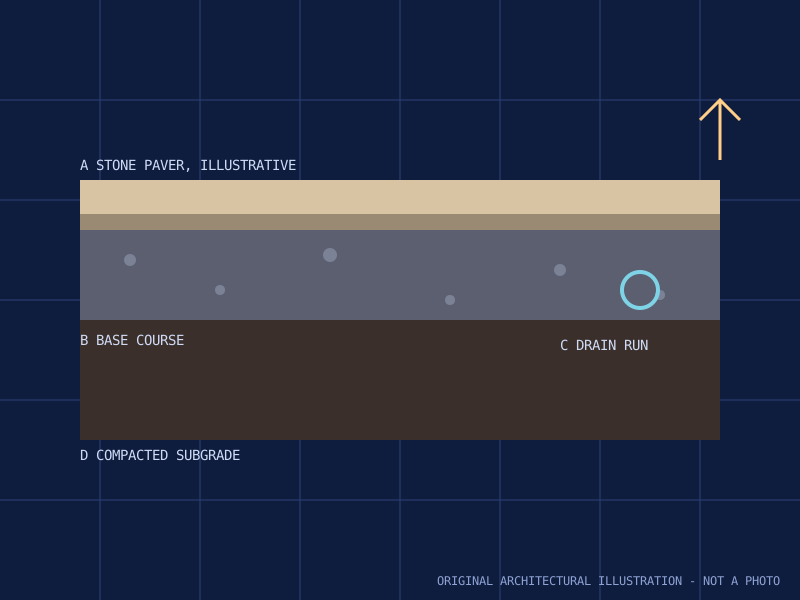
A drawn section explains what sits under the paver more clearly than a paragraph can.
What we built
Selecting paver, base, drain or subgrade marks that layer and explains why it matters, with a note that real specs require a site visit and a licensed professional.
Plate 2Original illustrated section by Hyper Solutions. Illustrative only, not an engineering specification.
Why the drawing matters for a buyer
If your business does work customers never see, a simple drawn section can do what photos cannot: show care below the surface. In the demo, each layer is a button, so visitors explore it at their own pace.
For your site, this pattern would use your own approved drawings, diagrams or photos and your own wording, reviewed by you.
03 · Desktop and phone
Same story, different reading posture.
Desktop
The headline sits over the wide dusk illustration, with both calls to action in the first view.
Rooms and materials sit beside their drawings, so the selected part and its explanation are read together.
The quote brief is placed next to its explanation, so the edit-then-send step is clear.
Phone
Sections stack into a single column; no sideways scrolling.
Room and material choices become full-size tap targets above their text.
The brief box keeps a comfortable height for thumb editing.
04 · Motion and fallbacks
Atmosphere that steps aside when asked.
Motion is a mood, not information, so nothing important depends on it. Here is how the demo behaves in each case.
Motion and fallback behaviour in the Lowlight demo
Situation
Behaviour
Default motion
Motion plays only when the hero is on screen and the device has not asked for reduced motion. It pauses itself when scrolled away.
Pause control
A real button with a pressed state toggles the motion at any time. It is labelled Play or Pause, never an icon alone.
Reduced motion
If the operating system prefers reduced motion, the page starts static, the control reads Static preview and is disabled, and a short note explains why.
Image failure
If the illustration fails to load, the art is removed, motion stops, and a status message confirms the walkthrough and inquiry still work.
Decorative vs meaningful
The hero art is hidden from assistive technology; the section drawings that carry information have descriptive alt text.
05 · The quote brief
The visitor writes the inquiry, not the form.
The demo ends with a prefilled, editable text box instead of a bare form. It works like this:
Read a starter briefA short paragraph describes the direction and states it is a fictional concept.
Edit it freelyVisitors rewrite it in their own words, up to 1,200 characters.
Carry it on clickThe text moves to the Hyper Solutions contact form only when the button is pressed.
Fallback if blockedIf the browser blocks saving, a message asks the visitor to copy the text and continue anyway.
In the demo, that button leads to Hyper Solutions, the studio behind the concept, because Lowlight does not exist. On a real site, the same pattern would send inquiries to your business, and its exact fields and handling would be agreed in your written scope.
06 · What this is not
Honest limits.
A client project. Lowlight Outdoor Works is invented; no business commissioned it.
Evidence of results. No traffic, lead or sales numbers exist, so none are shown.
Photography or video. Both images are original SVG illustrations; the motion is layered CSS over a drawing.
Construction advice. Material notes are illustrative; real specifications need a site visit and a licensed professional.
A feature list. A concept shows a direction; pages, features and price for your site are agreed in writing.
Next
Try the concept, then tell us about your own work.
Explore the working demo, or start a website inquiry with this concept noted as the reference. Scope and price are set with you in writing.